I finally decided to participate in the Old Computer Challenge this year. My goal this week is to only use the texting, calling, and camera functions of my phone, and to use the beige box as my only computer. I'm also going to try using 9front as much as possible. I'll be updating my "day" entries as each day progresses, as I can't rely on having any particular part of the day free and therefore need to take time wherever I can get it. I'll also be making my final additions and changes to any given day entry on the day following it.
It's the day after the challenge. I still spent the morning on the beige box, but I'm typing this now from my laptop. My priorities shifted toward retro computing over the week a bit, but there's still more practical work I need to get done with slightly more powerful hardware. I could do a lot over SSH from the desktop box, and I may explore that avenue a bit more, but right now I'm enjoying something like the feeling of "homecoming" that accompanies returning from a trip. My laptop's a lot more comfortable, and my habits well-worn.
I still would like to reduce my dependence on my mobile phone, however. I spent too much time staring at it today. I don't want to buy new, reduced-function hardware at this juncture, though, so we'll see what I can do with some rules and/or software.
Setting upasname has at least gotten the right email address showing up in the error messages, but I'm still getting errors of this sort when I try to send an email:
1133: marshal 1133: send 1134: fail
Mail  from 'lykso@lyk.so'
to 'lykso@lyk.so'
failed with error 'Invalid address'.

saved in /mail/box/glenda/dead.letter
No idea what's going on. Both of those look like valid addresses to me.
Last day of the challenge. Really frustrating that I've spent so much time on this particular problem. Have at least enjoyed looking at my phone less this week. I've done so much more book reading; I'd like to carry that on past the end of the week, as much as I can.
Finally asked for help in #oldcomputerchallenge on irc.libera.chat and in #cat-v on irc.oftc.net. Both channels were very helpful, and I'm glad I finally popped in. thedaemon in #oldcomputerchallenge suggested looking at /mail/lib/rewrite, and that turned out to be the issue. I'd updated /mail/lib/rewrite.gateway, which is just an example file. Copied it over to /mail/lib/rewrite, and all was well.
I used a combination of the instructions on the 9lab email page and the mail section of the FQA to set things up.
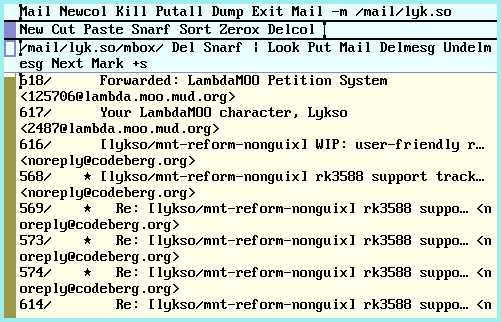
It's a little janky still, but with the core bits handled, smoothing things over shouldn't be too hard. Here's what my inbox looks like in acme:
Considering changing my email setup a bit to make upas connect "on demand" rather than "on boot." Having my email accounts in their own child namespaces rather than in the top-level rio namespace appeals for security reasons.
Once again, my goal today is to get email completely working. Yesterday I got IMAP going, but no luck with getting a client actually reading the resulting mbox yet, nor with sending mail.
Worked out how to get acme showing an inbox! Not so hard, in the end: Mail -f /mail/lyk.so
I'll want to eventually get something a little less janky put together, but it'll do for now.
No luck with the SMTP setup yet. Everything's still going into the glenda box. Haven't had much time to work on this today, though. Lots of time outdoors with the kiddo and in the kitchen tidying today. Did get some more Wendell Berry essays in, though, and read a bit more of Allen Strange's book, Electronic Music.
Fired a couple mugs yesterday, and pulled them from the kiln this morning. Wanted to share some photos, so I broke out the old Sony Mavica. Mounting the floppy disk in 9front was less straightforward than I was used to, so I'm documenting the process here:
term% dossrv -f /dev/fd0disk floppy
dossrv: serving /srv/floppy
term% mkdir $home/mnt
term% mount /srv/floppy $home/mnt /dev/fd0disk
Spent most of the morning out at the park with the kid. Gonna try again to get email set up today.
Still enjoying the reduced technology mode I'm in. Might extend a slightly loosened version of this past the end of the week. I'm really realizing how much the mobile phone and laptop together work to keep me isolated and distracted. I went in to a restaurant to order food to go this week instead of just ordering online. I've had my head up and eyes on my environment and the people around me a lot more. I'm seeing moments of missed connection between people in groups because one of them had eyes on a screen. Really making me feel even more strongly that selectively removing elements of modern technology from my life is probably the right call. (All the Wendell Berry I've been reading lately could also be a factor, I suppose!)
Updated my 9front page to document how I've secured my SSH key and passwords. Successfully registered my key with Codeberg via mothra and set up an empty repository, but wound up stuck when git9 wouldn't push my pre-existing repository to it. Not sure what its trouble was yet. Wound up just copying the whole repo to my Linux server and pushing it from there.
The repository I was trying to push was my personal fork of masto9, which as of now just reorganizes the arguments for "tootwithfile" and adds a required alt-text argument. (The original had no way to set alt-text on an image.)
I'd like to add a way to retrieve the thread a post belongs to as well, but my higher priority is getting email working so I can upstream my patches. I spent the last part of this day trying to adapt the 9lab email setup instructions to my own needs. I've got my emails for my non-Protonmail accounts pulled in via IMAP now, but I've not had any luck with sending emails yet, nor with getting anything resembling an email client to read my mboxes. (I know they're set up correctly because I can cat the contents, but I guess I just haven't yet figured out how to make either nedmail or acme's Mail work.
Been making a lot of progress, relative to how much I was making before this challenge, on that book of essays by Wendell Berry. Running into more places where I think he's almost right, or where we don't quite agree. I'd really like to return and write about it a bit once I've got the rest of the essays read and can form a more complete picture of his ideas and how they've evolved or (more accurately) changed emphasis over the years.
Figuring out yesterday that I could remote into my VMs from 9front really opened up some possibilities. I'll try not to abuse this newfound power, but this does give me a way to clear out my inbox a bit to perhaps give upas/fs a chance at loading it on this rather constrained device.
First goal today is to get masto9 set up. Second goal is to get my inbox cleared out a bit and then give upas/fs another go. I oughta learn how to use secustored, too, so I don't have a bunch of secrets and passwords lying around in plaintext on my harddrive.
linuxemu is ancient history and can only be run on a Plan 9 system booted with a 386 kernel and binaries. This section should really probably be removed, as you almost certainly want vmx(1) instead. Still, vmx(1) only works on beefy amd64 systems, and I used to run linuxemu on a ThinkPad T42 with decent results. Sometimes old and decrepit is worth keeping around.
Hmm. I in fact do not have a beefy AMD64 system here, and am in fact running a 386 kernel and binaries. Maybe I ought to give it a try.
Spent most of the day connected to my Debian VM via vncv, clearing out my email account via my provider's web client. Didn't revisit trying to get upas/fs set up, but I did successfully get my passwords and secrets tucked away in an encrypted file by following the instructions for using aescbc with factotum on the plan9.io wiki. When I start the computer, I'm prompted for my encryption password, the file is decrypted, and then the keys are loaded into factotum. Right now it fails and doesn't give me another chance if I mistype the password, so I'll have to address that on Day 5.
With upas/fs unable to handle mounting all my email accounts on this machine, I feel a little like I've prematurely reached the limit of what should be possible with this OS. No support for the sound card or the video card here either. I feel as if I might have had more success running 9front on my trusty old Thinkpad X60 and treating it as if it were a desktop. The only downside there would be the lack of support for the VGA port on the laptop. Each time I've tried exactly this configuration, I get nothing but noise on the external monitor. Still, I haven't dug into the problem. Might be solvable.
Retrozilla under Windows 98 has proven likewise unable to load my email account provider's webmail client. I wonder if there are email providers out there with lighter webmail options. I've also given a fair amount of thought to hosting my own email accounts, but that will have to wait until I have the necessary confluence of free time and nothing important going on in my comms.
I think my choice of OS might be somewhat at odds with the mobility component of my challenge. 9front demands a lot of study, being so different from what I'm used to, but constraining my computing time to time spent at my desk really reduces the amount of studying I'm able to do.
A bit flummoxed about what to do within the constraints of this challenge. No email access, except one account, and no Mastodon either yet. I could solve these problems by leaning ever more heavily on my media server, maybe even getting 9front running in qemu there and having it handle the tasks my old computer isn't cut out for. But that really starts to get outside of what I'd had in mind when I decided to do this challenge.
I've thought about relaxing the terms of the challenge, maybe switching to my 9front setup on the Thinkpad. But this would be a less creative solution than what I'd like to think I might come up with if I stick with this. I'm trying to follow the troughs and gulleys of my habits and finding them all blocked; of course I feel stymied. I oughta stay with it and see where I flow next.
I'm still gonna see if I can get masto9 set up on this thing, though.
I realized I could remote into the two desktop VMs running on my home server. This is probably cheating, but I think I'll use one of those to complete the server-side component of masto9's setup.
Writing this changes in acme over sshfs! My goals today are to get my non-Protonmail email addresses set up with 9front and to try finding a way to get heat shrink tubing ordered.
Tackling the heat shrink tubing first. Adafruit was promising at first, but they appear to require Javascript for state/province selection. Typing my state in did nothing; it kept giving me an error on that field. Still, the fact that I was able to get that far in the first place was impressive! I feel I might be able to write a script to shop on Adafruit without a browser at all, if necessary.
Success! Searching with DuckDuckGo for "heat shrink tubing" brought up a page from a hardware store chain with a location nearby. Sure enough, they had it in stock. More confirmation that I need to work harder on breaking the habit of online shopping.
Of course, the local hardware store doesn't have everything I might ever need. Getting something put together to enable shopping via Adafruit or similar is probably still not a bad idea.
End of the day. I got the heat shrink tubing. I got connected to one of my email addresses, but the next one I tried had so many messages that upas/fs wound up exhausting my physical memory. Neither netsurf nor mothra support the webmail interface either.
Being off my phone and restricted by my primary computing device has overall been a pleasant experience. I've gotten out of the house more, had my head up and my mind in my environment a lot more, done more book reading, and been pushed to shop more locally. With a little more relaxing of the rules, I could probably continue in this way for quite a while longer, honestly. Maybe I will. I dunno.
I might try accessing my webmail under Windows 98 with Retrozilla tomorrow, just to see if it works. I'd also like to see how its video performance compares to 9front's, as it has drivers specific to my video card that I don't think 9front does.
I spent the first part of this day working out how to connect to an ssh server running on a non-standard port and then updating my "Setup" entry below, writing directly in vim. Before the end of this challenge, I'd like to get my wiki pages directory mounted directly on 9front so I can start editing entries via acme
So far I've learned that, in 9front, one specifies TCP connections over non-standard ports via tcp!server!port, rather than via server:port. This does not hold true for all 9front utilities. For example, using ircrc to connect to irc.libera.chat over TLS on port 6697 is achieved with ircrc -p 6697 -T irc.libera.chat.
Getting my wiki pages mounted on 9front wasn't so hard, in the end. I had envisioned getting a 9fs share going, but sshfs fits my needs well enough and requires no extra setup on my server.
Difficulties I encountered on the first day included trying to watch a YouTube video and trying to order heatshrink tubing. I succeeded in the former case and haven't found a way to do the latter yet.
For YouTube, I was able to get Sigrid's video player, treason, working, but her nvi video downloader was not able to find an open Invidious instance to download from. (I imagine it would have worked with a Peertube-hosted video; Invidious instances have just gotten quite locked-down in the last year or so.) I count it as a slight cheat, but I wound up downloading the repair video I was looking for via yt-dlp on my server and then streaming it over sshfs to treason. I justified this by telling myself Invidious uses yt-dlp anyway, and that was I was doing wasn't so different from just using someone else's Invidious instace, but really it would have been better if I didn't need to rely on so much external, modern hardware to simply watch a video someone's trying to share in the usual, contemporary way.
For buying heatshrink tubing: nothing works without Javascript, and nothing works with the Javascript engine in netsurf. Amazon in particular failed spectacularly, not even rendering something resembling a website. If I had to guess, it looked like they might well have just been sending over gzipped content regardless of headers. I've done no verification of this hypothesis whatsoever, however.
The search for OCC-friendly shopping will continue on day 2, I suppose.
Avoiding the use of my phone hasn't proved as difficult as I thought it would, though I also cheated a little by looking at email subject lines as they came in to make sure I didn't miss anything important and (more egregiously) checking my Bandcamp stats.
I foresee more cheating by looking at email subjects in my future, particularly as I'm currently using a Protonmail address for an important legal matter. There's no IMAP bridge for 9front, as far as I know, and I intend to switch away from Protonmail anyway due to all their AI bullshit just as soon as I can afford to miss an email or two in the transition.
I've been meaning to participate in the Old Computer Challenge for a while now. This year there is no particular challenge posed to the participants, except to try to learn something. I'm so completely unprepared, despite having put this date in my calendar, that I'm not certain whether I will or won't get the time and space this week to dig into anything interesting. We'll see.
Here's my plan as it stands now:
Today is a particularly busy day for me, so I won't get much in the way of prep time. As it happens, my computing needs, as opposed to my wants, are modest, which might be my saving grace here. I've also already got my beige box set up and ready to go.
There is a bit of anachronism in my setup in that I am using an SD card to IDE adapter in place of an actual hard drive. I've got SD cards already set up with a number of OSes. This will allow me to switch between OSes considerably more easily, and less painfully, than I ever could have in the decade most of my setup hails from.
As for which OS I'll use primarily, I'm currently undecided. 9front is probably my overall most comfortable option. TinyCore Linux is an option, but I've found its packaging system cumbersome enough in actual practice that I've been avoiding using it. I also have a couple BSDs (FreeBSD and OpenBSD, if my memory serves correctly) but I remember these being quite slow compared to 9front. I also have Windows 98 and Windows 3.11 as my nostalgic options, but these are considerably less practical as they don't even have SSH clients that will work with most SSH servers these days, owing to their exclusively supporting obsolete cryptographic algorithms. My Windows 3.11 install in particular has also so far been unable to run a browser, crashing each time I attempt it. (I haven't worked out why this is, and I likely never will.)
This will be a return to my desktop-only days, some 19 years behind me now, and on more limited hardware than I had for most of that time. I expect I'll be leaning heavily on Sigrid Haflínudóttir's work. I have mixed feelings about this, as she has ceased work on 9front, and most of the reason I've considered 9front practical has been because of her work. (I recognize there are many links in the chain to "practical," but hers, at least, has been the "last inch" for me.) At the same time, she doesn't want people to stop using 9front because of her decision.
I'd really like to play with Kartik Agaram's Mu sometime soon. I think it'd be particularly fun to treat the beige box like a console for Mu, booting into images flashed to SD cards. Maybe after the OCC.
I'd not yet set up SSH access for the beige box on my media server or on tilde.town, so I spent a part of "day zero" following the instructions on the SSH page of the 9front wiki, which are very brief, and then working out how to get the key onto the relevant servers. This took a lot longer than it should have because I forgot I'd set up an nftables firewall on my laptop a few days ago to block all incoming connections. Once I remembered what I'd done and disabled the firewall, I was able to spin up an FTP server with Python and then connect to it from 9front via ftpfs.
For connecting securely to my media server without exposing my SSH server to the whole Internet and without porting Wireguard to 9front, I was able to connect a USB ethernet adapter to the server and run a cable directly from my beige box to it. I found documentation regarding setting Debian up to act as a router, which involved installing and configuring Kea, adding the new interface and its routes to my netplan config, and setting up masquerading and forwarding in iptables so the beige box could reach the Internet directly.
I'd never used Kea up to this point, but I was able to find an example configuration easily and adapt it to my needs. It's fairly long compared to the other snippets I'm including directly here, so I've put a redacted version in its own file, occ-kea-config.txt. Bits I've redacted are noted with angle brackets and the use of uppercase letters.
I'd hardly used netplan up until this point, but the error messages were informative and the documentation easy enough to parse. With identifying information redacted in the manner described above, this is what the netplan config for my primary interface looks like:
network:
  ethernets:
    <PRIMARY>:
      dhcp4: true
      dhcp6: false
      link-local: []
      addresses: [<PUBLIC FACING SERVER IP>/29]
      nameservers:
        addresses: [<ISP DNS #1>, <ISP DNS #2>, 9.9.9.9]
      routes:
        - to: default
          via: <PUBLIC FACING ROUTER IP>
        - to: 192.168.254.240/28
          via: <PUBLIC FACING SERVER IP>
          on-link: true
My secondary interface's netplan file looks like this, with redactions noted in the same manner as above:
network:
  ethernets:
    <SECONDARY>:
      addresses: [192.168.254.254/28]
      nameservers:
        addresses: [<ISP DNS #1>, <ISP DNS #2>, 9.9.9.9]
      routes:
        - to: 192.168.254.254/28
          via: 192.168.254.254
          on-link: true
I had some experience with iptables, having set up my media server's firewall with it, but I'd not done masquerading and forwarding before. It was just six lines added to each side of my firewall script:
$IPTABLES -A OUTPUT -i "$SECONDARY" -j ACCEPT
$IPTABLES -A INPUT  -i "$SECONDARY" -j ACCEPT
$IPTABLES -A FORWARD -i "$PRIMARY" -j ACCEPT
$IPTABLES -A FORWARD -i "$SECONDARY" -j ACCEPT
$IPTABLES -t nat -D POSTROUTING -o "$PRIMARY" -j MASQUERADE
$IPTABLES -t nat -D POSTROUTING -o "$SECONDARY" -j MASQUERADE
And:
$IPTABLES -D OUTPUT -i "$SECONDARY" -j ACCEPT
$IPTABLES -D INPUT  -i "$SECONDARY" -j ACCEPT
$IPTABLES -D FORWARD -i "$PRIMARY" -j ACCEPT
$IPTABLES -D FORWARD -i "$SECONDARY" -j ACCEPT
$IPTABLES -t nat -D POSTROUTING -o "$PRIMARY" -j MASQUERADE
$IPTABLES -t nat -D POSTROUTING -o "$SECONDARY" -j MASQUERADE